

Spotify Download Music Free – Android, iPhone, MacBook & PC (2026 Guide)
Looking for the best way to download Spotify music for free on Android, iPhone (iOS), MacBook, or PC?
Part 1. How to Download Spotify Playlist to MP3 on Desktop (Windows & Mac)
To make Spotify play better, there are a number of software providers that have created powerful Spotify to MP3 converters and downloaders. AudFun Spotify Playlist Downloader, also called AudFun Music Converter for Spotify, stands out from the crowd due to its extraordinary performances. It is a great professional tool to better explore Spotify music for both free and premium Spotify users.
AudFun can download a Spotify playlist to MP3 for free at up to 5X conversion speed. In addition to MP3, this program also supports downloading and converting Spotify to WAV, FLAC, M4A, M4B, and AAC. It is also available to keep 100% lossless ID3 tags and output quality of Spotify MP3 files.
AudFun Spotify Music Converter Key Features
- Convert a Spotify playlist to MP3, M4A, FLAC, WAV, etc.
- Convert Spotify playlist at a 5X faster conversion speed
- Save Spotify playlists with all ID3 tags and meta info kept
- Play Spotify MP3 playlists on all devices and players for free
Step-by-Step Guide to Download Spotify Playlist to MP3 with AudFun:
AudFun Spotify Playlist to MP3 Converter is highly compatible with Mac and Windows operating systems. To illustrate the full tutorial, let’s use the Windows version as an example here. For Mac users, you can also follow this guide to download Spotify playlists to MP3 on your Mac. The steps on the two operating systems are similar.
Step 1 Copy and paste the Spotify playlist link to upload
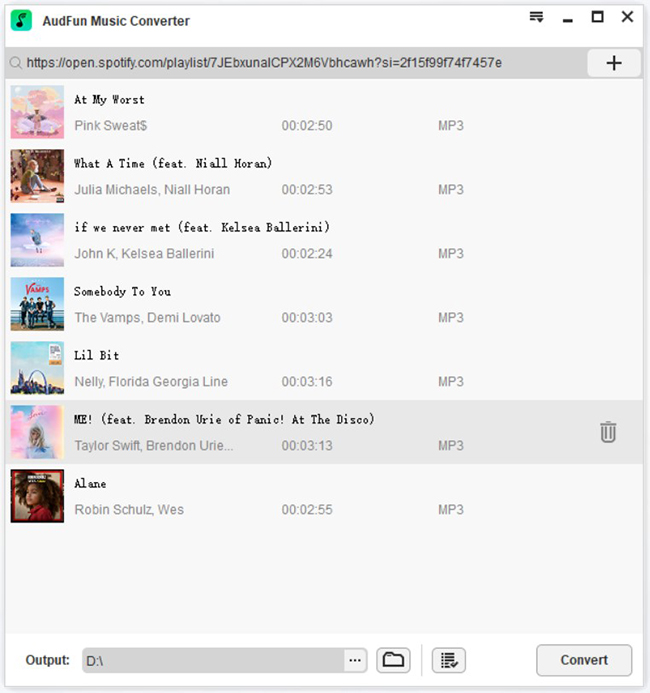
AudFun provides two ways to add Spotify playlists. One is to drag and drop songs from a Spotify playlist into the main screen. Another is to copy and paste the Spotify playlist link into the search box and click the ‘+‘ button to load them. The second method is suitable for people who want to download a lot of songs to MP3.
Step 2 Define output format as MP3 for Spotify playlists
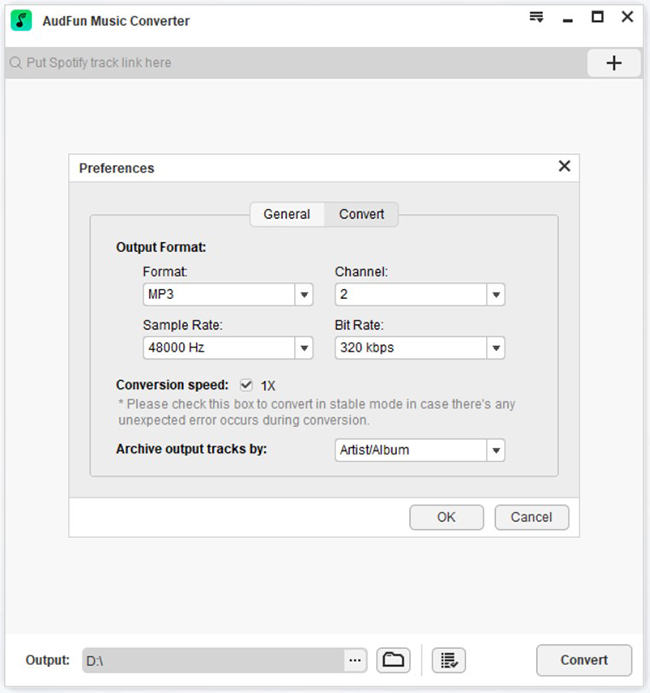
Open AudFun’s Settings window by clicking on the hamburger menu bar at the top to choose the Preferences > Convert options. You can then select the Output Format button and scroll down the button to select MP3 as the output format.
In addition, you can select Channel, Sample Rate, or Bit Rate options to customize other audio parameters of Spotify playlists to get better output quality. You can also choose the Archive output tracks by and export Spotify playlists by album or artist as you like.
Step 3 Download and convert Spotify playlist to MP3 for free
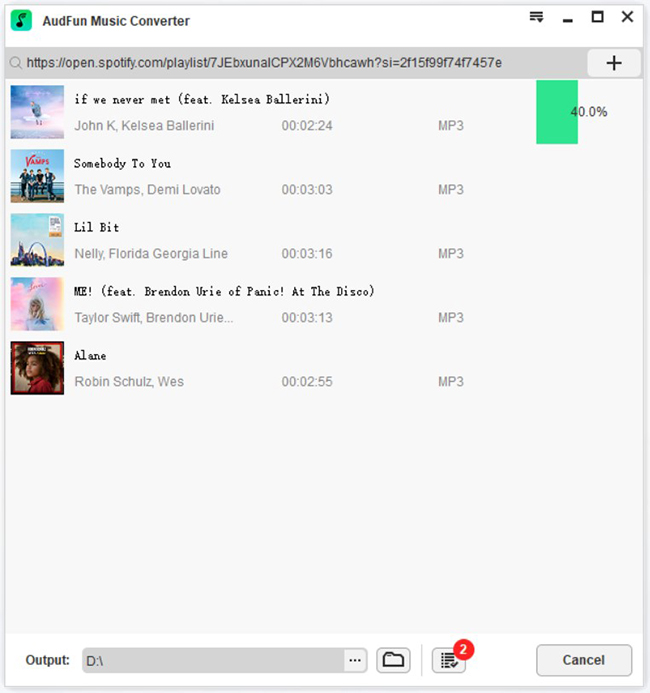
Once you’ve set everything up, the next step is to press the large Convert button. It’s in the lower right corner of the home screen. AudFun Spotify Playlist downloader downloads Spotify playlists to MP3 at up to 5X faster speed. If you want the conversion to be stable, please set the conversion speed to 1X. After completion, you can find the Spotify playlist MP3 downloads by tapping the History icon.
Part 2. How to Download Spotify Playlist to MP3 Online
If you don’t want to download any application on your computer, you can try some online tools to download Spotify playlists to MP3 as well.
Spotify Downloader is a free Spotify to MP3 converter for both free and premium subscribers. It’s a web-based tool without installing any software or extension. You can download Spotify playlists to MP3 at a fast speed in ZIP format with high quality. Besides playlists, it can also download songs and albums from Spotify and keep all the metadata info. Yet, this tool doesn’t support downloading podcasts, shows, or artist pages at the moment.
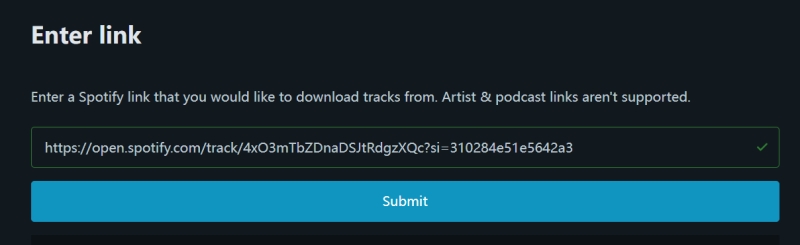
How to Download Spotify Playlist to MP3 Free Online:
Step 1. Open Spotify Downloader in your web browser.
Step 2. Launch the Spotify app or the Spotify web player. Find the Spotify playlist you want to download by going to the three-dot icon > Share > Copy link to playlist.
Step 3. Go back to the Spotify Downloader, and paste the playlist link to the search bar. Then click the Submit button and choose the songs you want to download. It will start to download Spotify to MP3 online for you.
Part 3. How to Download Spotify Playlist to MP3 on Mobile
With almost everyone owning a mobile phone, the age of intelligence has arrived. In this case, more and more people are using mobile devices to listen to Spotify playlists. Because it’s more convenient to carry than a computer. Thus, many users are eager to download Spotify playlists to MP3 on Android and iOS devices.
Here we will introduce Telegram to help you download Spotify playlists to MP3 on mobile devices. Telegram is a cross-platform messaging app used by iOS and Android users alike. You would be able to access the Spotify database thanks to the presence of a bot on the platform. After that, not only will you be able to share your cherished playlist with the people who follow you on Telegram, but you’ll also be able to take pleasure in the activity of downloading music from Spotify. Let’s take a look at how it works.
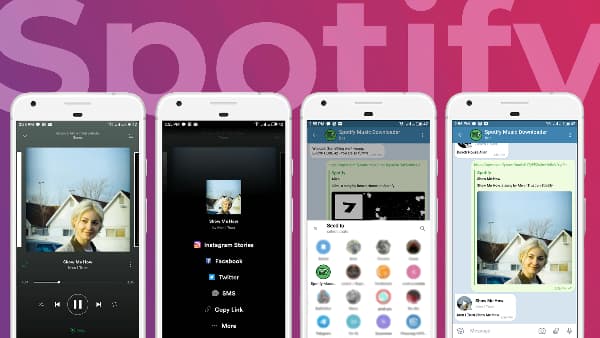
Download Spotify Playlist to MP3 on Mobile with Telegram:
Step 1. You may get Telegram from the App Store and then download and install it.
Step 2. Launch Spotify on your mobile device and copy the URL of the track or playlist you want to save to your device from Spotify.
Step 3. The next step is to activate Telegram and search inside Telegram for a Spotify music downloader.
Step 4. After that, under the searching solution, choose the Telegram Spotify bot, and then select the Start yellow journalism option.
Part 4. Bottom Line
With a Spotify Premium subscription, users have the right to listen to Spotify playlists offline. And Premium users can enjoy unlimited skipping music playback without ads. With a Free plan, you can access and play Spotify songs online with ads.
However, all users can only access Spotify songs on limited devices bundled with the Spotify app. Without a doubt, the best way to get rid of the restrictions is to download Spotify playlist to MP3. Because MP3 files have the highest compatibility.
Besides, there are some advantages to converting Spotify playlists to MP3. You can transfer Spotify music to a USB drive for playing in the car or other USB-enabled devices. You can burn Spotify playlists to CDs. In short, you will feel free to use Spotify playlists in your desired way.
3 Best Ways to Download Spotify Playlist to MP3 in 2024
Welcome to MZIQI.COM, your trusted hub for Spotify download tools, playlist converters, and MP3 music downloads.
1. Spotify Download Music Free Android – Top Playlist Downloaders for 2026
Android users have several options for Spotify playlist downloader Android and Spotify download music free Android. Popular free tools include:
- SpotiFlyer (APK): A dedicated Spotify downloader for high-quality MP3 extraction from playlists and tracks.
- Spowlo & SpotDown: User-friendly apps for batch downloads with support for albums and artists.
- Online Tools like Spotdown.org or SpotMate: Paste your Spotify link to download songs or playlists directly—no installation needed.
These work great for Spotify playlist downloader Android and save files as MP3 for any player.
Pro Tip: For best results, use a Spotify playlist downloader Android that supports 320kbps quality and metadata (artist, album art).
2. Spotify Song Download Playlist Free MacBook – Best Converters for macOS
On a MacBook, creating a Spotify song playlist is easy with desktop software or online converters. Top picks for 2026:
- Macsome Spotify Downloader or Sidify Spotify Music Converter for Mac: Convert Spotify playlists to MP3, AAC, or FLAC at high speed, even without Premium.
- Online Options like Spotdown or SpotifyMate: Browser-based for quick Spotify download music free MacBook without downloads.
- spotDL (open-source): Command-line tool for matching Spotify tracks to high-quality downloads.
These preserve ID3 tags and offer batch processing for entire playlists.
3. Spotify to MP3 Converter Chrome – Extensions & Online Tools
Searching for a Spotify to MP3 converter Chrome? While dedicated extensions are limited due to Chrome policies, reliable alternatives include:
- Online converters like SpotifyMate, SpotMate, or SpotiDown: Access via Chrome, paste the Spotify URL, and convert to MP3 instantly.
- Tools like SpotMate Spotify Downloader: Free, fast, and supports high-quality output with album art.
For better reliability, pair with desktop recorders that work alongside Chrome’s Spotify web player.
4. Spotify Downloader Converter for iPhone iOS – Free Options in 2026
iOS restrictions make Spotify downloader converter Spotify download music free iPhone iOS trickier, but these work:
- Online tools (Spotdown.org, SpotMate): Use Safari to download MP3 files directly—add as a home screen PWA for app-like access.
- SpotMate or similar web-based converters: No jailbreak needed; supports playlists and tracks.
- Transfer downloaded MP3s via computer to your iPhone’s Files app or third-party players.
Avoid risky IPA mods—stick to safe, browser-based methods for Spotify download music free iPhone.
5. Spotify Downloader Mate – Why SpotifyMate is Popular
Spotify downloader mate (SpotifyMate) is a top free online tool for converting Spotify to MP3. Key features:
- Download tracks, albums, playlists, and artists in high-quality MP3.
- No login or software required—works on all devices.
- Fast processing with album art preservation.
Access it at spotimate.app for easy Spotify to MP3 conversion.
6. Spotify to MP3 Converter App – Mobile & Desktop Picks
A great Spotify to MP3 converter app should support batch downloads and high quality:
- Mobile: SpotiFlyer (Android) or web PWAs like SpotMate (iOS/Android).
- Desktop: NoteBurner, AudiFab, or Macsome for 320kbps+ output.
These apps often include extras like lyrics or format options (MP3, FLAC).
7. Spotify Playlist Downloader PC – Free & Fast for Windows
For Spotify playlist downloader PC, try:
- Spotdown.org or SpotifyMate: Online and device-agnostic.
- Desktop software like TuneCable or Sidify: Batch convert playlists to MP3 with 10x speed.
- Open-source spotDL: Ideal for tech users downloading full playlists with metadata.
These support large playlists and high-quality exports.
Legal & Safe Spotify Offline Listening (Recommended)
The official way? Upgrade to Spotify Premium for encrypted offline downloads (up to 10,000 tracks per device). No third-party tools needed—works on Android, iOS, MacBook, and PC. Downloads expire if offline for too long, but it’s fully legal and supports artists.
Why choose Premium? Ad-free, high-quality streaming, and true offline access without conversion risks.
Ready to try these tools? Visit mziqi.com/tools for more guides, comparisons, and safe download links. Which Spotify downloader works best for you? Share in the comments!
This guide covers safe, easy, and updated methods to download Spotify songs and playlists without a premium.
Spotify Download Music Free on Android
Downloading Spotify music on Android is one of the most searched topics today. While Spotify Premium allows offline listening, many users prefer free Spotify MP3 downloads.
Best Options for Android:
- Spotify playlist downloader Android tools
- Spotify to MP3 converter apps
- Online Spotify downloader converters
How it works:
- Copy the Spotify song or playlist link
- Paste it into a Spotify downloader
- Convert and download as MP3
📌 Works without Spotify Premium
Spotify Song & Playlist Download Free (MP3)
Want to download entire Spotify playlists instead of single songs?
Supported formats:
- MP3 (most popular)
- 320kbps high-quality audio
- Offline storage on phone or computer
Popular searches:
- Spotify song download playlist free
- Spotify playlist downloader Android
- Spotify playlist downloader PC
MZIQI.COM helps you discover fast Spotify playlist downloaders that support bulk downloads.
Spotify Download Music Free on MacBook (macOS)
Mac users often ask how to download Spotify music for free on a MacBook without installing heavy software.
Recommended methods:
- Spotify to MP3 converter (browser-based)
- Spotify downloader converter tools
- Chrome-compatible Spotify converters
✔ Compatible with MacBook Air & MacBook Pro
✔ No iTunes required
✔ No Premium account needed
Spotify Download Music Free on iPhone (iOS)
Downloading Spotify music on an iPhone is more restricted, but still possible using alternative methods.
Spotify downloader iPhone options:
- Spotify downloader mate
- Online Spotify to MP3 converter (Safari-based)
- File manager + cloud method
⚠ iOS limitations apply, but MZIQI.COM provides step-by-step guides to make it easy.
Spotify to MP3 Converter (Chrome & Apps)
Spotify does not allow direct MP3 downloads, which is why Spotify to MP3 converters are in high demand.
Top converter options:
- Spotify to MP3 converter Chrome extensions
- Spotify to MP3 converter apps
- Online Spotify downloader converters
These tools extract audio and save it as MP3 for:
- Offline listening
- DJs & playlists
- Personal backups
Spotify Downloader Mate – Is It Worth It?
Spotify Downloader Mate is a commonly searched tool that allows users to convert Spotify tracks to MP3 quickly.
Features:
- No login required
- Supports playlists
- Fast conversion speed
- Mobile & desktop friendly
MZIQI.COM reviews Spotify downloader tools to help users choose safe and working options.
Spotify Playlist Downloader for PC (Windows)
PC users enjoy the widest range of Spotify download tools.
Best solutions:
- Spotify playlist downloader PC software
- Spotify to MP3 desktop converters
- Web-based playlist downloaders
🎧 Ideal for:
- DJs
- Music collectors
- Offline libraries
Why Use MZIQI.COM for Spotify Downloads?
MZIQI.COM is optimized for music lovers, DJs, and casual listeners who want:
✔ Updated Spotify download guides
✔ Safe Spotify MP3 converter recommendations
✔ Android, iOS, MacBook & PC solutions
✔ High-quality music downloads
✔ African & global music focus
Final Note
Spotify downloads should be for personal use only. Always support artists by streaming officially where possible.
👉 Visit MZIQI.COM for more Spotify download guides, MP3 music, DJ mixes, and playlists updated daily.